By
By 
Point your camera at a moving fan blade or spinning object with clear markings, then shoot at 1/1000s or faster in electronic shutter mode. If the blade appears bent, slanted, or distorted in the image, you’re witnessing rolling shutter—the telltale sign that your camera’s sensor reads data line-by-line rather than all at once. This simple test reveals how your specific camera handles fast motion, which directly impacts everything from sports photography to panning shots.
Record the degree of distortion you observe, then compare it against known benchmarks for your camera model. A quick sweep past vertical lines—like a fence or building edge—while panning horizontally will show you whether those lines remain straight or become diagonal. The more severe the slant, the slower your sensor’s readout speed, meaning you’ll need to work around this limitation in high-speed scenarios.
Calculate your camera’s rolling shutter coefficient by dividing the frame height by the number of scan lines that appear distorted during a known motion speed. Professional cameras typically show minimal distortion with coefficients under 20ms, while consumer models may exceed 30ms. Understanding your specific number helps you determine which shooting situations will cause problems—fast-moving subjects across the frame are most vulnerable, while slower motion or tracking shots remain manageable.
Test under your actual shooting conditions rather than controlled environments. Sports photographers need different thresholds than wedding videographers, and what’s acceptable for stills may be unusable for video work.
What Rolling Shutter Actually Does to Your Photos

The Science Behind the Wobble
When you press your camera’s shutter button, you might assume your sensor captures the entire scene in one instantaneous moment. In reality, most modern digital cameras read the sensor data progressively, much like a scanner moving across a document from top to bottom. This sequential capture method is what causes rolling shutter artifacts.
Think of your camera’s sensor as containing millions of tiny light-sensitive pixels arranged in rows. During electronic shutter operation, the camera activates and reads these rows one at a time, starting from the top and working downward. While this happens incredibly quickly, often in just a few milliseconds, it’s not truly simultaneous. This means the top of your image is captured at a slightly different moment than the bottom.
The time it takes for your sensor to scan from the first row to the last is called the readout speed or scan time. Faster readout speeds mean less time difference between capturing the top and bottom of your frame, which translates to fewer rolling shutter issues. A camera with a 20-millisecond readout captures the entire frame in one-fiftieth of a second, while a camera with a 5-millisecond readout completes the scan four times faster.
This scanning process becomes problematic when photographing fast-moving subjects or panning your camera during exposure. Since different parts of your image are captured at different moments, moving objects can appear distorted, tilted, or wobbled, creating those telltale rolling shutter effects you’ve likely noticed when photographing spinning propellers or moving vehicles.
When Rolling Shutter Becomes a Real Problem
Rolling shutter isn’t just a theoretical concern—it creates visible problems in several popular photography genres. Understanding when it matters most helps you test your camera appropriately and make informed decisions about gear and technique.
Sports photographers face rolling shutter challenges constantly. A tennis racket mid-swing might appear bent, golf clubs can look like rubber, and baseball bats often show dramatic curves that weren’t there in real life. Fast panning shots of sprinters or cyclists can produce leaning effects where the subject appears to tilt unnaturally. If you shoot sports regularly, testing your camera’s rolling shutter performance should be a priority, especially if you’re considering upgrading bodies.
Aviation and automotive photography present similar challenges. Propeller blades on aircraft often display distinctive curved or stepped patterns due to rolling shutter, even at relatively fast shutter speeds. Race cars with rapidly spinning wheels can show oval-shaped tires instead of circular ones. These distortions become more pronounced when panning to follow fast-moving subjects, which is standard technique in these genres.
Video work amplifies rolling shutter problems significantly. Handheld camera movements create the characteristic “jello effect” where vertical lines wave and wobble. Quick pans produce skewed frames that look amateur. If you’re shooting action sequences or working without stabilization, a camera with slow sensor readout will fight you every step of the way. Video shooters should prioritize testing rolling shutter performance before committing to a camera system.
Beyond motion-based distortions, rolling shutter can also contribute to LED flicker banding issues in certain shooting conditions. Understanding your camera’s readout speed helps you anticipate when these artifacts might appear and adjust your shooting approach accordingly.

How to Test Your Camera’s Shutter Speed Performance
The Fan Test Method
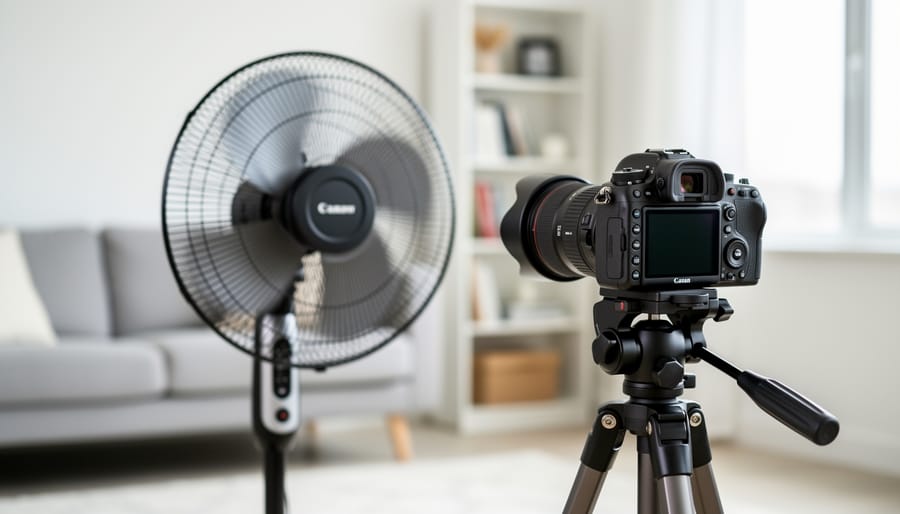
One of the simplest and most accessible ways to test your camera’s rolling shutter performance is the ceiling fan method. This practical technique requires nothing more than a household fan and about five minutes of your time, making it perfect for photographers who want immediate answers without specialized equipment.
Start by setting up in front of any fan with visible blades. A ceiling fan works beautifully, but a desk fan or standing fan will do just as well. Position yourself so the fan fills a good portion of your frame, and set the fan to its highest speed setting. The faster the blades spin, the more pronounced any rolling shutter effects will become.
Configure your camera to shutter priority mode and select a shutter speed between 1/250 and 1/500 second. These speeds are fast enough to freeze most motion but slow enough relative to your camera’s readout speed that rolling shutter artifacts will appear if present. Use continuous autofocus if available, and take several shots at different shutter speeds to compare results.
When you review your images, look carefully at the fan blades. A camera with minimal rolling shutter will show relatively straight blades, though they may appear slightly bent due to the blade’s actual motion during exposure. However, severe rolling shutter produces dramatically skewed or wave-like distortions, where straight blades appear to curve, twist, or take on a pronounced diagonal slant that doesn’t match the blade’s physical shape.
The degree of distortion you observe directly correlates to your camera’s sensor readout speed. Mechanical shutters typically produce the cleanest results, while electronic shutters on slower-reading sensors create the most dramatic effects. This quick test gives you real-world insight into whether rolling shutter will impact your specific photography style.
Testing with Rapid Panning
One of the simplest yet most revealing tests for assessing your camera’s rolling shutter performance is the quick pan test. This hands-on method requires nothing more than your camera and a subject with vertical lines, such as a picket fence, window blinds, or even a row of trees.
Here’s how it works: set your camera to record video at your desired frame rate, then quickly pan horizontally across your chosen subject. The faster you pan, the more pronounced any rolling shutter issues will become. When you review the footage, watch carefully for vertical lines that appear slanted or skewed rather than remaining straight. The more severe the slant, the slower your camera’s readout speed.
For photographers primarily interested in still images, you can adapt this test by shooting in continuous burst mode while panning rapidly. Examine each frame for distortion in the vertical elements. While this method is less precise than video testing, it still gives you valuable insight into how your camera handles fast movement.
When interpreting your results, consider what you’re actually seeing. Slight distortion during extremely rapid pans might not impact your real-world shooting if you typically photograph static subjects or use slower, controlled movements. However, if you notice significant skewing even with moderate panning speeds, this suggests your camera may struggle with action photography, sports, or any scenario involving quick lateral movement.
The beauty of this test is its accessibility. You can perform it anywhere, anytime, giving you immediate feedback about your equipment’s capabilities without specialized tools or calculators.
Reading the Results
Once you’ve completed your shutter speed test, interpreting the results helps you understand your camera’s capabilities. Minimal distortion—where straight lines remain mostly straight with only slight slanting—indicates a fast readout speed, typically under 10 milliseconds. This performance is excellent for action photography, sports, and any situation involving fast-moving subjects or rapid camera movements.
Moderate distortion shows more pronounced leaning or wobbling effects. While not ideal for professional sports work, this level is perfectly acceptable for most everyday photography, including street photography, landscapes, and portraits. You’ll only notice issues when panning quickly or photographing very fast subjects.
Severe distortion, where vertical lines bend dramatically or objects appear warped, suggests a slower sensor readout around 30-50 milliseconds or more. This doesn’t make your camera unusable—it simply means you’ll need to work around the limitation by avoiding rapid pans and shooting fast action with mechanical shutter when possible.
Similar to testing for camera artifacts, understanding your baseline performance helps you make informed decisions. If your photography rarely involves moving subjects, even significant rolling shutter may never impact your work. The key is knowing your camera’s behavior so you can adapt your technique accordingly.
Using a Rolling Shutter Calculator to Measure Readout Speed
What the Numbers Actually Mean
When you test your camera’s sensor readout speed, you’ll get a number measured in milliseconds. But what do those numbers actually tell you about your camera’s performance?
Think of readout speed like film speeds used to work – there are clear performance tiers. Under 10ms is excellent territory. Cameras in this range, like the Sony A9 series or Canon R3, handle fast action beautifully. You can pan with race cars, shoot sports with electronic shutter, and photograph spinning propellers without noticeable distortion. These are the cameras where rolling shutter rarely enters your mind.
The 10-20ms range is good for most photography. Your typical mirrorless cameras from Canon, Nikon, and Sony fall here. You’ll manage handheld video just fine, and action photography works well with mechanical shutter. You might see some wobble when panning quickly past vertical lines, but it’s usually not a deal-breaker unless you’re shooting Formula 1 or professional sports.
Once you cross into 20ms and beyond, you’re entering problematic territory for certain situations. Video becomes challenging – handheld footage shows noticeable jello effect during camera movements. Fast-moving subjects like golf swings or tennis serves show visible lean. Electronic shutter becomes essentially unusable for anything moving.
The practical takeaway? If you primarily shoot landscapes or portraits, even 30ms won’t bother you. But action photographers and videographers should aim for sub-15ms whenever possible.
Comparing Your Camera to Others
Once you’ve tested your own camera, you’ll naturally want to know how it stacks up against other models. This is where online rolling shutter databases become invaluable research tools.
Several websites maintain extensive databases of camera readout speeds measured in milliseconds. Cinema5D and DPReview both offer searchable collections showing how various cameras perform at different resolutions and frame rates. For instance, you might discover that your Sony A7 III has a rolling shutter of approximately 20ms in full-frame 4K mode, while the Canon EOS R5 clocks in around 15ms, and the Sony A1 boasts an impressive 8ms.
These comparisons help you understand whether upgrading would meaningfully reduce rolling shutter artifacts in your work. If you’re shooting fast-panning sports footage and your current camera measures 25ms, stepping down to a 12ms model could make a noticeable difference. However, if you primarily shoot landscapes or portraits, that same upgrade might not justify the investment.
When using these databases, pay attention to testing conditions. A camera’s rolling shutter performance often varies dramatically between 4K and 1080p modes, or when using crop versus full-sensor readout. The Panasonic GH5, for example, shows approximately 17ms in standard 4K but drops to around 8ms when using its high-speed variable frame rate mode.
Real-world context matters too. A mirrorless camera with 18ms readout might produce visible wobble when panning quickly at a concert, but remain perfectly acceptable for controlled interview setups or tripod work. Use these benchmarks as guides rather than absolute verdicts on camera quality.
Real-World Shutter Speed Scenarios and Solutions
Adjusting Your Shooting Technique
Once you understand your camera’s rolling shutter characteristics, you can adjust your shooting approach to minimize those distracting artifacts. The good news is that small technique changes often make a dramatic difference.
Start with your panning speed. If you’re photographing moving subjects, try slowing down your pan to better match the subject’s motion. Think of it like this: when shooting a cyclist passing by, a smooth, controlled pan creates less distortion than quick, jerky movements. Practice tracking subjects at various speeds to find that sweet spot where motion blur works creatively rather than creating obvious skew.
Your shutter choice matters significantly. Mechanical shutters generally produce fewer rolling shutter artifacts than electronic shutters because they expose the entire frame simultaneously. However, electronic shutters offer silent operation and faster burst rates, making them ideal for certain situations. Be aware of electronic shutter issues when shooting under artificial lighting or capturing fast action. If you notice wobble or skew in your images, switch to mechanical shutter mode when possible.
Your shooting angle also plays a role. Photographing subjects moving perpendicular to your sensor creates the most pronounced rolling shutter effects. Try positioning yourself to capture more diagonal or frontal movement instead. For example, when shooting cars on a track, shooting from a corner where vehicles approach at an angle produces cleaner results than shooting from the straightaway where they’re moving directly across your frame.
When to Upgrade (And When You Don’t Need To)
Here’s the truth: most photographers don’t need to upgrade their camera just because of rolling shutter. Before you drop thousands of dollars on new gear, ask yourself one critical question: does rolling shutter actually impact the photos you’re currently taking?
If you’re a landscape photographer who occasionally captures a flag fluttering in the breeze, those minor wavy distortions probably aren’t killing your shots. Similarly, portrait photographers working with controlled movements rarely encounter noticeable artifacts. In these cases, simple workarounds like adjusting your shutter speed, changing your panning technique, or timing your shots differently will solve 90% of your concerns.
However, certain photography styles genuinely benefit from upgrading. Sports photographers shooting fast action with telephoto lenses, automotive photographers panning at racetracks, and drone pilots capturing propeller-driven aircraft face rolling shutter challenges that workarounds can’t fully address. If you’re frequently delivering work where distorted vertical lines, leaning buildings during quick pans, or propeller jello consistently appear in your final images, an upgrade to a camera with faster readout speeds becomes a legitimate business investment rather than gear lust.
Consider the financial equation too. If you’re billing clients and rolling shutter artifacts are costing you time in post-processing or, worse, losing you repeat business, the math changes quickly. A camera body that solves the problem might pay for itself within a few assignments.
The sweet spot? Test your current gear thoroughly first. Shoot the scenarios that matter to your work, examine the results critically, and only upgrade when you can point to specific, recurring problems that alternative techniques can’t solve. Your portfolio will guide the decision better than any spec sheet.
Which Cameras Handle Rolling Shutter Best
Understanding which cameras minimize rolling shutter effects can save you from disappointing results, especially if you shoot fast action, video with pans, or subjects with quick movements. The good news is that camera technology has made significant strides in recent years, and several approaches exist to tackle this challenge.
Cameras with stacked sensors represent one of the most effective solutions for reducing rolling shutter. These sensors feature a unique architecture where the processing circuitry sits beneath the light-capturing photodiodes, rather than alongside them. This design allows for dramatically faster readout speeds—sometimes 10 to 20 times quicker than conventional sensors. Real-world examples include many recent flagship mirrorless cameras, which can scan their entire sensor in as little as 1/200th of a second. This speed virtually eliminates visible distortion in most everyday shooting scenarios, including sports and wildlife photography.
Global shutter technology takes a different approach entirely by capturing all pixels simultaneously, much like a mechanical shutter. This eliminates rolling shutter artifacts completely, regardless of subject movement. While historically limited to specialized professional video cameras and industrial applications, global shutter sensors are gradually making their way into consumer cameras. The tradeoff has traditionally been slightly reduced image quality or dynamic range, though recent implementations have narrowed this gap considerably.
Mechanical shutters remain relevant in this discussion, particularly for high-resolution still photography. When you fire the shutter, physical curtains block and reveal the sensor simultaneously across the frame, preventing the line-by-line readout issues inherent to electronic shutters. However, mechanical shutters have limitations—they wear out over time, create vibrations, and produce noise that can disturb subjects.
For video shooters, readout speed becomes even more critical since you’re capturing 24, 30, or more frames per second. Cameras marketed specifically for hybrid photo-video use typically prioritize sensor readout performance. Look for specifications mentioning readout times under 10 milliseconds for excellent performance, 10-20 milliseconds for good performance, and be cautious with anything exceeding 30 milliseconds if you frequently shoot moving subjects or handheld footage.

Understanding your camera’s rolling shutter performance isn’t just about numbers on a spec sheet—it’s about knowing what your gear can and cannot do in the situations you actually shoot. Whether you’re capturing fast-moving sports, panning with a subject, or simply want to avoid unpleasant surprises during critical moments, this knowledge empowers you to make informed creative decisions.
The beauty of rolling shutter testing is that it’s accessible to everyone. You don’t need expensive equipment or a lab environment to test your camera—just a willingness to experiment and observe. The results you gather become part of your technical toolkit, helping you anticipate when rolling shutter might become an issue and plan accordingly.
For those considering new gear, understanding rolling shutter performance adds another valuable dimension to your purchasing decision alongside resolution, autofocus, and other features. And if you’re working with equipment you already own, knowing its limitations means you can work around them creatively rather than being caught off guard.
Take the time to run these tests yourself. The insights you gain will make you a more confident, capable photographer who truly understands the tools in your hands.


 By
By