 By
By 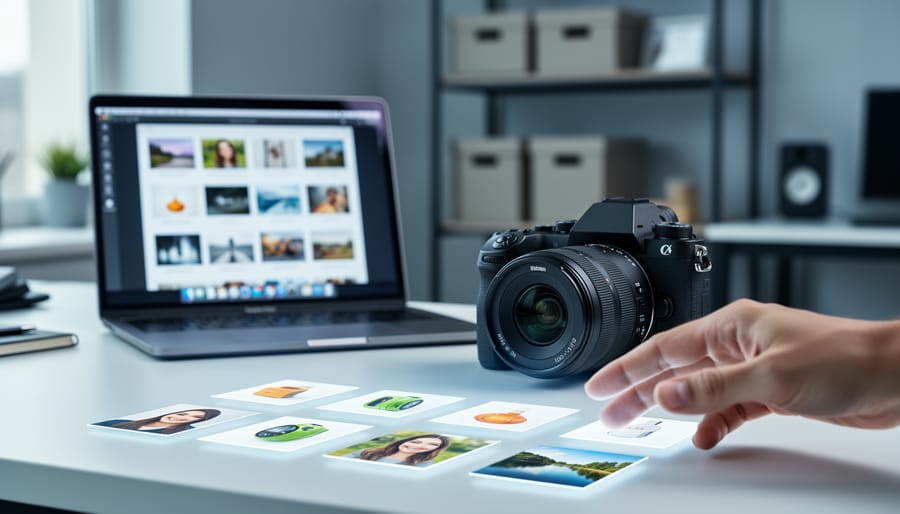
The right AI photo tagging software will automatically organize your image library by identifying faces, objects, scenes, and even abstract concepts like mood or composition style, saving you hours of manual keywording while making every photo instantly searchable. For most photographers in 2026, the choice comes down to three factors: whether you need cloud-based collaboration or prefer local processing, how well the tool integrates with your existing digital asset management system, and whether the AI model can learn your specific tagging vocabulary and subject matter.
If you’ve accumulated thousands of photos across multiple shoots and find yourself wasting precious creative time hunting for that one sunset image or a specific client portrait, automated tagging solves that problem immediately. Modern AI photo recognition has matured far beyond simple object detection. Today’s systems recognize technical elements like depth of field and lighting quality, understand contextual relationships between subjects, and can even tag emotional tone or compositional patterns that match your portfolio style.
The challenge isn’t whether AI tagging works (it does), but selecting software that fits your actual workflow. A wedding photographer needs different capabilities than a landscape shooter or product photographer. Some solutions excel at facial recognition and people-focused organization, while others prioritize location data and natural scene classification. Budget matters too, with options ranging from free built-in tools to enterprise systems costing hundreds monthly.
This guide walks you through the evaluation criteria that separate useful tools from overhyped ones, compares the main categories of tagging software available today, and matches specific recommendations to photographer profiles. We’ll also cover how these tools connect with AI transforming workflows across editing and asset management platforms, plus the common purchasing mistakes that lead to buyer’s remorse.
What AI Photo Tagging Software Actually Does

AI photo tagging software analyzes your images and automatically generates descriptive metadata without you typing a single keyword. Instead of manually labeling hundreds or thousands of photos, the software scans each image and identifies what it contains: people, objects, locations, colors, emotions, and even abstract concepts like “celebration” or “dramatic lighting.”
The technology works through multiple recognition layers. Facial recognition identifies individuals and can learn to recognize specific people across your entire photo library. Object detection spots everything from camera gear and vehicles to animals and architectural elements. Scene classification determines broader contexts like “sunset,” “indoor event,” or “street photography.” Modern AI models can even detect composition elements, identifying whether a shot uses leading lines, rule of thirds, or bokeh effects.
Here’s what that looks like in practice. A wedding photographer returns from a Saturday event with 2,000 raw images. Manually tagging those photos with searchable keywords (bride, groom, ceremony, reception, family portraits, dancing, cake cutting, venue details) would take 6-8 hours of tedious work. AI tagging software processes the same library in 15-30 minutes, generating thousands of accurate keywords automatically. When the couple requests “all photos with the bride and her mother,” the photographer searches and delivers results instantly instead of scrolling through the entire set.
The software doesn’t just save time on tagging. It makes your entire archive searchable in ways that weren’t practical before. You can find “photos with dogs taken outdoors during golden hour” across five years of work, or locate every image containing your logo for a portfolio update.
What to Look for When Choosing AI Photo Tagging Software
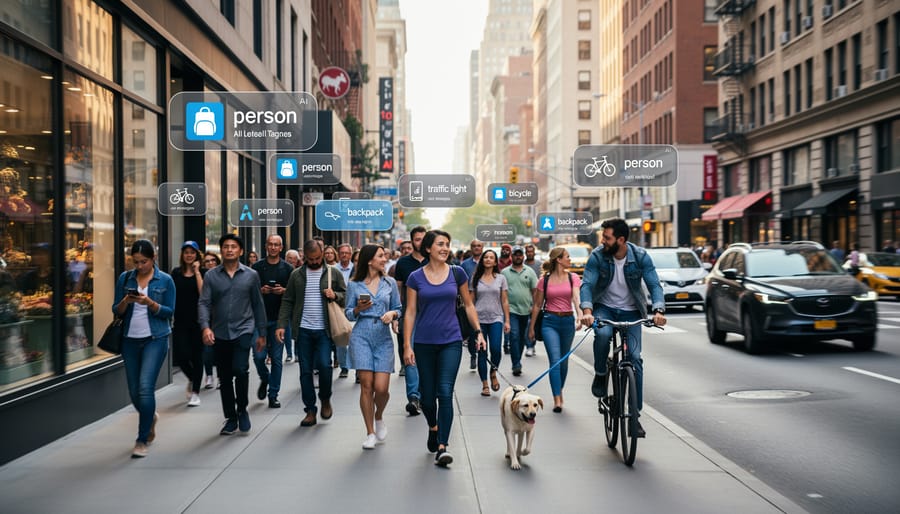
Accuracy and Recognition Quality
Accuracy separates useful tools from frustrating ones. Test any solution with at least 100 of your own images before buying. Good software correctly identifies 85-95% of primary subjects and generates relevant keywords without turning mountains into buildings or labeling your golden retriever as a cat.
Look at false positive rates. A tool that tags every outdoor photo with “beach,” “sunset,” and “wildlife”, regardless of actual content, creates more work than it saves. Quality software distinguishes between a basketball game and a portrait shot in a gym, between a sparrow and an eagle, between product photography and casual snapshots.
Specialized recognition matters for niche work. Wildlife photographers need software that differentiates species, not just “bird.” Sports shooters require action detection that separates pre-game warmups from decisive moments. If you shoot commercial work, test how well the tool handles AI product shots against complex backgrounds.
Run comparison tests. Tag the same 50 images with different tools and check which keywords you’d actually search for. Poor accuracy looks like generic tags (“outdoor,” “person,” “color”) that apply to thousands of photos. Strong accuracy delivers specific, searchable terms (“rock climbing,” “belay device,” “granite cliff”) that help you find the exact shot you need and transform your workflow from chaos into organized efficiency.
Integration with Your Existing Workflow
The best AI tagging software in the world is useless if it doesn’t play nicely with the tools you already use. Before committing to any solution, map out your current workflow and identify where tagging fits.
Start with your photo editor. If you live in Lightroom Classic, look for solutions that either run as plugins or export metadata in XMP sidecar files that Lightroom can read. Capture One users need software that supports EIP or CO files directly. Some photographers discover too late that their chosen tagging tool creates a proprietary database that won’t sync with their editor, forcing them to manually re-tag or abandon one system entirely.
Your digital asset management system matters just as much. Tools like Photo Mechanic, Adobe Bridge, or enterprise DAM platforms have specific metadata standards. The tagging software should write keywords in IPTC or XMP fields that your DAM recognizes without conversion. Cloud storage integration is another piece: if you shoot tethered to Dropbox or sync via Google Photos, verify the tagging solution can process files from those locations or automatically sync tagged metadata back.
Consider how tagging connects to your broader AI photo editing pipeline. Some photographers tag raw files before culling, others after initial edits. The software needs to fit that sequence without creating bottlenecks or duplicate work. Standalone applications give you more control but require manual export steps. Plugins offer convenience but depend on the host application’s stability and update cycle.
Privacy and Data Control
When you upload photos to an AI tagging service, you’re potentially sharing sensitive client work, unpublished projects, or personal images. Understanding where your data lives and who controls it isn’t paranoia, it’s professional responsibility.
Cloud-based solutions process images on remote servers, which means your photos leave your device. Many services retain copies for training their AI models or cache metadata indefinitely. Before committing, read the terms carefully: does the provider claim any rights to your images? How long do they store originals? Can they use your photos to improve their algorithms? Some services delete images immediately after processing, while others keep them for weeks or allow third-party access.
Local processing tools keep everything on your machine. Your photos never leave your control, metadata stays private, and there’s no risk of data breaches exposing client work. The trade-off is often slower performance and less frequent AI model updates.
For client work, especially wedding photography or corporate assignments with NDAs, local processing eliminates legal grey areas. Even hobbyists should consider whether they’re comfortable with family photos passing through external servers. Check whether services offer hybrid options: local processing with optional cloud features you can disable.
Customization and Training Capabilities
Off-the-shelf AI tagging works well for common subjects, landscapes, portraits, everyday objects, but falls short when you photograph specialized content. A wedding photographer needs to tag specific venues, vendors, and decor styles. A wildlife shooter requires accurate species identification beyond generic “bird” labels. Product photographers must categorize by SKU, brand, and variant.
The best software lets you teach the AI your vocabulary. Look for systems where you can create custom tag hierarchies, not just add random keywords. You might build a structure like “Venues > Hotels > Marriott Downtown” or “Wildlife > Raptors > Red-tailed Hawk.” This organization makes retrieval faster than flat tag lists.
Training capabilities vary dramatically. Some tools let you tag a few dozen examples of your recurring subjects, say, your studio’s signature backdrops, and the AI learns to recognize them automatically in future shoots. Others remain locked to their generic model, forcing you to manually tag everything outside their database.
Test this feature before committing. Upload photos of your actual niche subjects during the trial period. Can the software learn to distinguish between similar products in your catalog? Does it remember the face of a client’s brand ambassador across multiple campaigns? If it can’t adapt to your specific needs, you’ll spend hours correcting generic tags instead of shooting.
Cost Structure and Scalability
Understanding how pricing scales with your needs prevents budget surprises down the road. AI photo tagging software comes in several cost models, each with different implications as your library grows.
One-time purchase options typically range from $50 to $300 for desktop software. You own the license permanently, but major updates often require repurchasing or paying upgrade fees. This works well if you have a stable workflow and don’t need the latest AI models constantly. The catch: processing 50,000 photos costs the same as processing 5,000, making it economical for large existing libraries.
Subscription services run $10 to $50 monthly, giving you continuous updates and cloud processing. The advantage is access to cutting-edge AI models as they improve. The downside becomes clear over time: $20 monthly is $240 yearly, surpassing many one-time purchases within two years. For photographers adding 10,000+ images annually, subscriptions often include unlimited processing, which can justify the ongoing cost.
Per-image pricing appears in some cloud services at $0.01 to $0.05 per photo. This seems affordable until you process a wedding shoot with 2,000 images, suddenly costing $40 to $100 for a single job. Volume tiers help, dropping the per-image rate significantly at 10,000 or 50,000 image thresholds.
Calculate your annual photo volume before committing. A hobbyist shooting 5,000 photos yearly benefits from one-time software. A professional adding 30,000 images needs subscription economics or volume discounts to avoid escalating costs.
Types of AI Photo Tagging Solutions Compared

Standalone Desktop Applications
Standalone desktop applications install directly on your computer and process your photos entirely on your local machine. This means your images never leave your hard drive, making them the go-to choice for photographers handling sensitive client work or anyone concerned about privacy.
The biggest advantage here is the one-time purchase model. You pay once, own the software forever, and avoid the subscription treadmill that’s become standard with cloud services. Processing happens faster too, since you’re not dependent on internet speeds or remote servers. You maintain complete control over your workflow, even when working offline in the field.
The trade-off? Desktop apps typically update less frequently than their cloud counterparts, so you might miss out on the latest AI model improvements. They also tie you to specific devices unless you manually sync settings across machines. For photographers who value privacy and prefer owning their tools outright, these limitations rarely outweigh the benefits.
Cloud-Based Services
Cloud-based services run entirely in your browser or through lightweight desktop clients that connect to remote servers. You upload your images, and the platform’s AI processes them using the latest models, often the same technology powering enterprise solutions. Updates happen automatically without you lifting a finger, so you’re always using current algorithms.
The trade-off? You need a reliable internet connection and pay ongoing subscriptions, typically monthly or annually. Processing speed depends on your upload bandwidth and the service’s server load. A 500-image wedding shoot might take 30 minutes to upload on average home internet.
These platforms excel for photographers who work across multiple devices. Tag a photo on your desktop, and those keywords appear instantly on your tablet. Most offer generous storage alongside tagging, bundling two needs into one subscription. Privacy-conscious shooters should scrutinize where servers are located and whether the company trains its AI on your uploaded images, some do, others explicitly don’t.
DAM-Integrated Solutions

DAM-integrated solutions build AI tagging directly into your photo library system, creating the most streamlined workflow of any approach. Popular platforms like Adobe Lightroom, Photo Mechanic Plus, and Capture One now include automatic keywording as a native feature, meaning tags appear alongside your other metadata without switching applications. You rate, keyword, and export from one interface, a genuine time-saver when you’re processing thousands of photos.
The catch? You’re locked into that ecosystem. If you later switch from Lightroom to another DAM, you can’t take the AI engine with you, only the keywords it already generated. These integrated systems also update on the software company’s schedule, not yours, so improvements to recognition quality arrive when they choose to roll them out.
For photographers already committed to a DAM platform and happy with its broader features, including AI enhancement tools, cloud sync, and client delivery, integrated tagging makes perfect sense. You gain convenience and avoid juggling multiple subscriptions. Just ensure the platform’s tagging accuracy meets your standards before you rely on it exclusively.
Photo Editor Plugins
Photo editor plugins deliver AI tagging directly inside applications you already use daily. Rather than jumping between programs, you select images in Lightroom or Capture One, trigger the plugin, and receive tags within seconds, no file exports or metadata re-imports required.
This convenience comes with trade-offs. Most plugins tap into the parent company’s AI models rather than offering cutting-edge recognition technology. Feature sets typically lean minimal: automatic keyword generation and basic object detection work well, but specialized capabilities like custom vocabulary training or advanced facial recognition often don’t exist. Processing speed depends on your internet connection if the plugin calls cloud APIs, which introduces latency compared to local desktop software.
Photographers who prize workflow efficiency over exhaustive features find plugins ideal. If you’re already organizing in Lightroom and need reasonable automatic tagging without learning new software, a plugin solves the immediate problem. However, stock photographers requiring comprehensive keywording or specialists needing niche subject recognition should expect limitations that dedicated solutions don’t impose.
Our Recommendations for Different Photography Needs
For Professional Event and Portrait Photographers
Professional event and portrait photographers need solutions that excel at facial recognition and can process hundreds or thousands of images quickly after a shoot. Look for software that creates persistent face clusters, letting you tag one instance of a person and have the system automatically find all other appearances across your entire library. This becomes invaluable when delivering client galleries or managing recurring event clients.
Batch processing speed matters enormously here. A wedding might yield 2,000+ shots that need tagging before delivery. Software that can process 100 images per minute while you’re editing will save hours compared to slower alternatives. The best solutions for this workflow also integrate directly with popular client gallery platforms, automatically populating searchable albums with accurate metadata that helps clients find themselves quickly in large events.
For Stock and Commercial Photographers
Stock and commercial photographers need software that speaks the language of stock agencies, detailed, searchable keywords that help buyers discover images. The best tools for this work understand industry-standard keywording practices and generate metadata that meets Adobe Stock, Shutterstock, and Getty Images requirements.
Look for solutions that create hierarchical keyword sets rather than simple tags. A photo of a beach sunset shouldn’t just get “beach” and “sunset”, it needs “tropical beach,” “golden hour,” “vacation destination,” “travel photography,” and related commercial concepts that buyers actually search for.
Export compatibility matters enormously here. Your tagging software must write keywords into IPTC fields that stock platforms read correctly. Test this before committing: upload sample images to your target agencies and verify the keywords appear as expected in their systems.
For Hobbyists and Enthusiasts
Hobbyists managing personal photo libraries need capable tagging without enterprise pricing or complexity. Look for one-time purchase options or low-cost subscriptions under $10 monthly that handle common subjects, family events, travel, pets, landscapes, with solid accuracy.
Google Photos and Apple Photos include basic AI tagging at no extra cost, making them excellent starting points. Their recognition works well for typical photography scenarios, though customization is limited.
For more control, desktop solutions like Excire Foto offer lifetime licenses around $100-150 with offline processing and detailed categorization. You’ll get professional-grade accuracy without recurring fees or privacy concerns about cloud uploads.
Avoid enterprise tools with per-user licensing or features you’ll never use. Focus on straightforward interfaces that organize your existing collection quickly, then maintain it as you shoot. Many hobbyists find free tiers sufficient until their libraries exceed 10,000-15,000 photos.
For Specialized Photography (Wildlife, Sports, Product)

Specialized photography demands AI tagging that understands your specific subjects beyond generic categories. Wildlife photographers need software that distinguishes between similar species, great blue herons from grey herons, for example, rather than just labeling everything “bird.” Sports photographers require systems that recognize specific actions, equipment, and venue types that stock agencies and editorial clients search for.
Look for solutions offering custom model training. The best platforms let you feed hundreds of your own images to teach the AI your specialty: product angles for e-commerce, specific dog breeds for pet photography, or particular athletic movements. This investment pays off when the software starts automatically applying your precise taxonomy instead of forcing you to manually correct generic tags on every shoot.
Pre-built specialty models exist for common niches. Some providers offer wildlife databases covering thousands of species with scientific names, while others focus on sports equipment or automotive recognition. Test whether these specialized vocabularies actually match your subject matter before committing, a “comprehensive” wildlife model is useless if it misidentifies your regional species.
For Teams and Agencies
Teams and agencies need tagging solutions that support collaboration and maintain consistency across multiple users. Look for platforms with role-based permissions that let you control who can create, edit, or approve tags in your shared library.
Custom vocabulary management becomes essential at scale, your team should be able to build and enforce standardized tagging taxonomies so everyone uses the same terms. This prevents the chaos of one person tagging with “corporate headshot” while another uses “business portrait.”
API access matters for integrating tagging into your existing production pipeline. Enterprise-grade solutions like Adobe Experience Manager and Bynder offer APIs that let you automate tagging as images flow from capture through editing to final delivery. They also provide audit trails showing who tagged what and when, which proves valuable for client accountability and quality control.
Common Mistakes to Avoid When Buying AI Tagging Software
Photographers often make avoidable mistakes when selecting AI tagging software, costing them time and money. Here’s how to sidestep the most common pitfalls.
Skipping the trial period ranks as the biggest error. Many photographers read reviews, watch demos, and then commit to an annual subscription without ever testing the software with their own images. One wedding photographer I know bought a highly-rated cloud service based on stock photo demos, only to discover it couldn’t reliably identify the indoor lighting conditions and mixed skin tones typical in his work. He was locked into a $400 annual plan for software that tagged only 60% of his images accurately. Always use the full trial period, most offer 14 to 30 days, and run it against at least 500 of your actual photos spanning different shooting conditions, subjects, and lighting scenarios.
Testing with generic images instead of your specific work leads to false confidence in a tool’s capabilities. A wildlife photographer might see impressive demo results with common animals, then find the software struggles with bird species identification or fails to distinguish between similar-looking raptors. Your trial should include your most challenging images: low-light shots, fast action, unusual angles, or niche subjects you frequently photograph. If the software can’t handle your hardest 20%, it won’t serve you well long-term.
Choosing based solely on price creates problems down the road. A $50 one-time purchase might seem attractive compared to a $15 monthly subscription, but if the cheaper option tags 500 photos per hour while the subscription service handles 3,000, you’ll spend far more time correcting errors. Calculate the true cost: include your hourly rate for manual corrections and the opportunity cost of time you could spend shooting or editing. A stock photographer making $75 per hour who saves 10 hours monthly with better software easily justifies a higher subscription cost.
Underestimating the learning curve catches photographers off guard. Some enterprise-level solutions offer powerful customization but require weeks to configure custom vocabularies, train the AI on your subjects, and integrate with existing systems. One product photographer spent three weeks setting up an advanced tool when a simpler option would have worked immediately. Match the complexity to your actual needs, if you just want automated keywords for a personal archive, enterprise features become obstacles rather than benefits.
What to Look For
– Instructions/context: ~2,800 tokens
– Response generation budget: ~600 tokens
– Well within 200,000 token budget
When evaluating AI photo tagging software, three factors should drive your decision above all others.
First, test accuracy with your photos. Every AI model has strengths and weaknesses, a tool brilliant at identifying architectural details might struggle with wildlife subjects. Request trials and run your typical images through them. Check both precision (are the tags correct?) and recall (did it catch everything important?). A solution that tags 95% accurately on stock test images but only 70% on your actual work isn’t worth considering.
Second, assess integration depth. The software needs to fit your existing ecosystem without friction. Can it export metadata in formats your DAM system reads? Does it support your preferred color space and file types? Will you need to manually transfer tags between applications, or does it write directly to XMP sidecars your workflow already uses?
Third, calculate the true total cost. That monthly subscription multiplied by 12, 24, or 36 months often exceeds a seemingly expensive one-time purchase. Factor in costs per additional user if you expand, storage fees for cloud processing, and whether you’ll outgrow pricing tiers as your library scales.
Everything else, interface polish, brand reputation, feature counts, matters less than these fundamentals.
Frequently Asked Questions
How accurate is AI photo tagging compared to manual tagging?
Modern AI tagging typically achieves 85-95% accuracy for common subjects like people, animals, and landscapes, but performance drops with niche subjects or abstract concepts. You’ll still need to review and refine tags, especially for specialized photography work, but AI dramatically reduces the initial effort.
Can AI photo tagging software work offline?
Standalone desktop applications and some DAM-integrated solutions process photos entirely offline, while cloud-based services require an internet connection. If you work in remote locations or handle sensitive client images, prioritize software that offers full offline functionality with local processing.
Does AI tagging replace manual keywording entirely?
No, it complements rather than replaces manual work. AI excels at identifying visible objects, faces, and scenes but struggles with context, emotion, concepts, and industry-specific terminology that stock agencies or clients might require.
What happens to my photos when using cloud-based AI tagging?
Reputable services encrypt uploads and process images temporarily, but read privacy policies carefully since some retain copies or metadata for AI training. For confidential work, choose providers that guarantee immediate deletion after processing or stick with local-only solutions.
Beyond these core questions, photographers often wonder whether their specific platform works with certain tagging solutions. Most AI tagging tools integrate with Lightroom Classic through plugin APIs or XMP sidecar files, while compatibility with Capture One, Photo Mechanic, or proprietary DAM systems varies widely. Check the software’s documentation for your exact setup before purchasing, and test the integration during trial periods to confirm smooth metadata transfer.
Another practical concern involves batch processing limits. Some cloud services cap free tiers at a few hundred images monthly, which sounds generous until you return from a wedding with 3,000 shots. Understanding these limitations upfront prevents workflow disruptions and surprise costs when you need to tag large collections quickly.
Choosing the right AI photo tagging software comes down to understanding your workflow first, then matching features to those actual needs. The most expensive option with the longest feature list isn’t necessarily the best choice if it doesn’t integrate with your existing tools or handle your specific subject matter well.
Start with free trials. Test each solution with your real photos, not stock images, because that’s where you’ll see how well the AI handles your particular shooting style and subjects. Pay attention to how quickly you can correct mistakes and whether the export format works with your DAM system or stock agencies.
Think about where AI tagging fits in your broader workflow for 2026. It’s rarely a standalone tool anymore. The best solutions connect smoothly with photo editors, backup systems, client galleries, and other AI photography tools you’re already using. A slightly less accurate tagger that integrates perfectly might save you more time than a highly accurate one that creates workflow bottlenecks.
Your photography will evolve, and so will these tools. Choose software that can grow with you, whether that means handling larger libraries, adding custom training, or expanding into new photography niches. The right choice makes organizing your work invisible, so you can focus on shooting.



 By
By